|
Build a better product and save time by taking the guess work out of OpenGL debugging gDEBugger helps you locate those "hard-to-find" OpenGL bugs. With gDEBugger, you can trace your application activity on top of the graphic system to track down and remove bugs caused by incorrect use of the OpenGL API. Your OpenGL based applications will run with fewer problems and will be compatible with different hardware configurations.
Gain better product performance With the precise graphic system insider information you get from gDEBugger, you can identify and remove graphic system performance bottlenecks, remove redundant OpenGL state changes, find "performance killer" OpenGL calls and OpenGL errors. Your applications will run faster, smoother and at an optimal level.
Become a better OpenGL developer with gDEBugger gDEBugger helps you tweak your OpenGL application developing. See how changes you make affect the graphic system, the application's visual display, performance and accuracy. Perform regression tests to see how current OpenGL application and graphic hardware behavior compares with an earlier application and hardware versions.
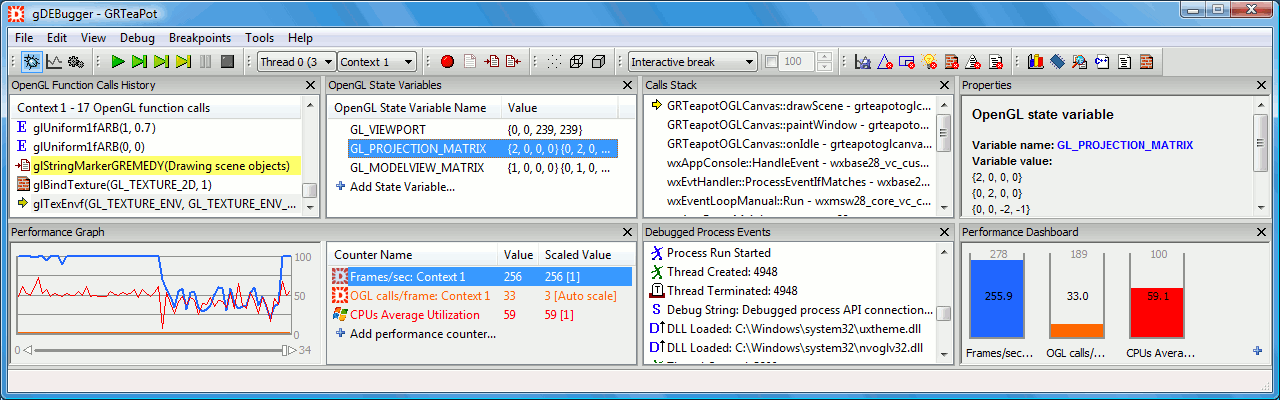
Frees vital screen space With its small and intuitive GUI, gDEBugger can be tailored to your needs. gDEBugger offers a large range of customization options, enabling you to define the exact set of toolbars, data viewers and views you want to see. Only the small sub-set of functionality needed for each debugging or profiling task is displayed at any given time. You work from a small main window while still having reach to a large set of commands and views. An "always on top" option removes the interrupting expose callbacks caused by the debugger's main window.
Support, support and more support gDEBugger supports all OpenGL versions up to version 2.1 standard and a large range of OpenGL, WGL and GLX extensions. It runs on current Microsoft operating systems (Windows Vista, and Windows XP) and on Linux i386 and x86_64 architectures.
|
|
Main features
- Support all OpenGL versions up to version 2.1 standard and additional OpenGL, WGL and GLX extensions.
- Support OpenGL ES version 1.1 standard and additional OpenGL ES and EGL extensions.
- Support Windows Vista, Windows XP and Linux i386 and x86_64 architectures.
- Support multi-context and multithreaded applications.
- Launch any OpenGL or OpenGL ES application for a debug session.
- Suspend the application process run at the next OpenGL function or draw call.
- Put a breakpoint in an OpenGL function / extension function.
- Track OpenGL errors and automatically suspend the application run when OpenGL errors occur.
- View the application's threads call stack and the associated source code.
- View your graphic scene as it is being rendered, either in full speed or in slow-motion mode.
- Force the OpenGL Polygon Raster mode to view the rendered geometry.
- Locate graphic pipeline performance bottlenecks using the "Performance Analysis toolbar", "Performance Graph view" and "Performance Dashboard View".
- View OpenGL Function Calls Statistics to locate (and then remove) redundant OpenGL function calls, OpenGL state changes, etc.
- Support NVIDIA GPUs Performance Counters via NVPerfKit.
- Support ATI Hardware Performance Counters.
- View and log the OpenGL calls executed in each OpenGL context.
- Output an OpenGL calls log into a file.
- View OpenGL state machine variables. Automatically compare the current state machine variables' values to the default OpenGL values or to a stored state machine values snapshot
- View allocated texture objects, their parameters and the textures' data as an image or as "raw data" arrays.
- View static buffers' and pbuffers' data as an image or "raw data" arrays.
- Textures and buffers data can be saved as image files to the disk.
- View allocated GLSL programs and shaders, their parameters, active uniforms' values and Shaders' source code.
- GLSL shaders "Edit and Continue" ability which allows you to Edit, Save and Compile Shaders source code, as well as Link and Validate Programs "on the fly".
- Display the current machine and OpenGL implementation details, including the available pixel formats and OpenGL extension.
|